SED stands for stream editor.
To remove last line of any file:
sed -i "$ d" <file_name.txt>
-i means, edit in place --> if you do not give -i then it will not change the result in the main file. Just give you the result on the shell. Giving -i will modify the original file directly at the same time.
Delete any
word: Both single quote and double quote will work.
sed -i 's/unix//g' <file_name.txt>
sed -i 's/\<unix\>//g' <file_name.txt>
sed -i 's/\bunix\b//g' <file_name.txt>
we want to delete all unix word from the mentioned file.
Substitute word:
sed -i 's/unix/linux/g' <filename.txt>
we want to substitute all the unix word with linux.
s for substitute and g for global. If you do not give g, then it will only replace once. for example, say we have unix word in 4 lines. if we do not give g then only first line unix word will be replaced. 2,3, and 4th line will remain same.
gi for ignore character case.
Begins with:
sed -i 's/^unix/linux/g' <filename.txt>
we want to substitute all words with linux that begins with unix.
Ends with:
sed -i 's/os.$/system/g' <filename.txt>
we want to substitute all words with system that ends with os.
Exact match:
sed -i 's/\bopen\b/close/g'
\b for boundary
or
sed -i 's/\<open\>/close/g'
we want to find exact keyword open and replace with close.
Replace with nothing in the replacement pattern:
sed -i 's/c//g' <file_name.txt>
find all c and remove all c
all the c's will be removed from the file.
This is how we can also remove comment # (pound character)
sed -i 's/#.*//g' <filename.txt>
# This is my comment line.
The above command will remove # This is my comment line. on that line because of . (dot) and *
. (dot) means all characters after hash # and * means whatever the last thing you just typed, say any number of those.
so it will remove # sign and everything that comes after that line which is the whole line (# This is my comment line.)
Remove all spaces or white spaces:
sed -i 's/\s*//g' <filename.txt> (remove all the spaces)
sed -i 's/\s*#.*//g' <filename.txt>
asdsdfsdfs # i am putting comment here.
it will remove the space before # hash as well as everything after the hash. so remaining data will be asdsdfsdfs
We can concatenate two sed commands:
sed -i 's/\s*#.*//g;s/c/C/g' <filename_txt>
It will remove # sign and everything after that line then it will replace lower c with capital C.
Removing blank lines:
sed -i '/^$/d' <filename.txt>
or
sed -i '/^[[:space:]]*$/d' <filename.txt>
or
sed -i -r '/^\s*$/d' <filename.txt>
Replacing pattern like example.org to example.com:
say roaster.txt contains the following data:
tom@example.org
billy@example.org
jay@example.com
sed -i -r 's/^(billy|tom)@.*example\.org/\1@example\.com' roaster.txt
The result will be:
tom@example.com
billy@example.com
jay@example.com
Delete all the lines that contains any specific work. for example, 10 lines contains word unix. So the following command will delete all 10 lines.
sed -i '/unix/d' <filename.txt>
Deleting first word of each line of a file:
sed -i 's/[^ ]* //' <filename.txt>
To replace multiple blank spaces with a single space:
sed -i 's/ */ /g' <filename.txt>
To remove empty lines or those beginning with # from the Apache configuration file, do:
sed '/^#\|^$\| *#/d' httpd.conf
The caret sign followed by the number sign (^#) indicates the beginning of a line, whereas ^$ represents blank lines. The vertical bars indicate boolean operations, whereas the backward slash is used to escape the vertical bars.
In this particular case, the Apache configuration file has lines with #’s not at the beginning of some lines, so *# is used to remove those as well.
Inserting single blank line in files:
sed G myfile.txt
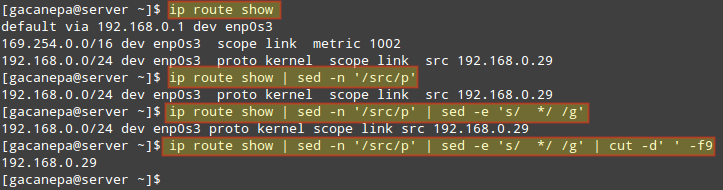
Combining sed with cut command:
ip route show | sed -n '/src/p' | sed -e 's/ */ /g' | cut -d' ' -f9
see the below image for example.
https://www.tecmint.com/wp-content/uploads/2016/07/Combine-sed-with-Other-Commands.png
Deleting lines from a particular file :
To Delete a particular line say n in this example
Syntax:
sed 'nd' filename.txt
Example:
sed '5d' filename.txt
To Delete line from range x to y
Syntax:
sed 'x,yd' filename.txt
Example:
sed '3,6d' filename.txt
To Delete from nth to last line
Syntax:
sed 'nth,$d' filename.txt
Example:
sed '12,$d' filename.txt
Avi
Comments
Post a Comment